> ## Documentation Index
> Fetch the complete documentation index at: https://docs-dev.auth0-mintlify.app/llms.txt
> Use this file to discover all available pages before exploring further.
# Configure Third-Party Applications
> Create and configure third-party applications using the Auth0 Dashboard or Management API.
export const AuthCodeGroup = ({children, dropdown}) => {
const [processedChildren, setProcessedChildren] = useState(children);
useEffect(() => {
let unsubscribe = null;
function init() {
unsubscribe = window.autorun(() => {
const processChildren = node => {
if (typeof node === "string") {
let processedNode = node;
for (const [key, value] of window.rootStore.variableStore.values.entries()) {
const escapedKey = key.replaceAll(/[.*+?^${}()|[\]\\]/g, (String.raw)`\$&`);
processedNode = processedNode.replaceAll(new RegExp(escapedKey, "g"), value);
}
return processedNode;
} else if (Array.isArray(node)) {
return node.map(processChildren);
} else if (node && node.props && node.props.children) {
return {
...node,
props: {
...node.props,
children: processChildren(node.props.children)
}
};
}
return node;
};
setProcessedChildren(processChildren(children));
});
}
if (window.rootStore) {
init();
} else {
window.addEventListener("adu:storeReady", init);
}
return () => {
window.removeEventListener("adu:storeReady", init);
unsubscribe?.();
};
}, [children]);
return {processedChildren};
};
export const AuthCodeBlock = ({filename, icon, language, highlight, children}) => {
const [displayText, setDisplayText] = useState(children);
const [copyText, setCopyText] = useState(children);
const wrapperRef = React.useRef(null);
useEffect(() => {
let unsubscribe = null;
function init() {
if (!window.autorun || !window.rootStore) {
return;
}
unsubscribe = window.autorun(() => {
let processedChildrenForDisplay = children;
let processedChildrenForCopy = children;
for (const [key, value] of window.rootStore.variableStore.values.entries()) {
const escapedKey = key.replaceAll(/[.*+?^${}()|[\]\\]/g, (String.raw)`\$&`);
let displayValue = value;
if (key === "{yourClientSecret}" && value !== "{yourClientSecret}") {
displayValue = value.substring(0, 3) + "*****MASKED*****";
}
processedChildrenForDisplay = processedChildrenForDisplay.replaceAll(new RegExp(escapedKey, "g"), displayValue);
processedChildrenForCopy = processedChildrenForCopy.replaceAll(new RegExp(escapedKey, "g"), value);
}
setDisplayText(processedChildrenForDisplay);
setCopyText(processedChildrenForCopy);
});
}
if (window.rootStore) {
init();
} else {
window.addEventListener("adu:storeReady", init);
}
return () => {
window.removeEventListener("adu:storeReady", init);
unsubscribe?.();
};
}, [children]);
useEffect(() => {
if (!wrapperRef.current) return;
const originalWriteText = navigator.clipboard.writeText.bind(navigator.clipboard);
let isOverriding = false;
const handleClick = e => {
const button = e.target.closest('[data-testid="copy-code-button"]');
if (!button || !wrapperRef.current.contains(button)) return;
isOverriding = true;
navigator.clipboard.writeText = text => {
if (isOverriding) {
isOverriding = false;
navigator.clipboard.writeText = originalWriteText;
return originalWriteText(copyText);
}
return originalWriteText(text);
};
setTimeout(() => {
if (isOverriding) {
isOverriding = false;
navigator.clipboard.writeText = originalWriteText;
}
}, 100);
};
const wrapper = wrapperRef.current;
wrapper.addEventListener('click', handleClick, true);
return () => {
wrapper.removeEventListener('click', handleClick, true);
if (navigator.clipboard.writeText !== originalWriteText) {
navigator.clipboard.writeText = originalWriteText;
}
};
}, [copyText]);
return
{displayText}
;
};
Create third-party applications that allow external developers, partners, or AI agents to access your APIs with enhanced security controls.
## Prerequisites
Before creating a third-party application, make sure you have:
* An Auth0 tenant with at least one [API (resource server)](/docs/get-started/apis) configured
* At least one [connection](/docs/authenticate/identity-providers) promoted to the [domain level](/docs/authenticate/identity-providers/promote-connections-to-domain-level) (for user-facing flows)
## Create a third-party application
Create a third-party application using the Auth0 Dashboard or Management API.
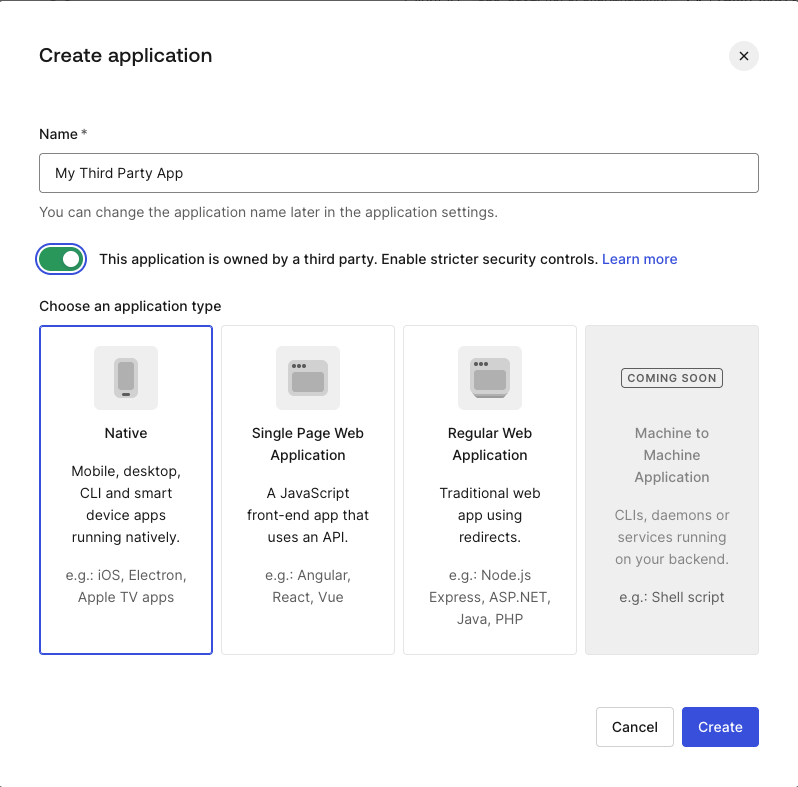
1. Navigate to **Applications > Applications**.
2. Select **Create Application**.
3. Enter a name for the application and select the application type:
* Regular Web App for server-side confidential clients
* Single Page App for browser-based public clients
* Native for mobile or desktop public clients
4. Check the **This application is owned by a third party** toggle.
5. Select **Create**.
 Make a `POST` request to the `/api/v2/clients` endpoint with the following request body:
```bash cURL wrap lines theme={null}
curl --request POST \
--url 'https://YOUR_DOMAIN/api/v2/clients' \
--header 'Authorization: Bearer YOUR_MANAGEMENT_API_TOKEN' \
--header 'Content-Type: application/json' \
--data '{
"name": "Partner Application",
"is_first_party": false,
"app_type": "regular_web",
"callbacks": ["https://partner.example.com/callback"],
"grant_types": ["authorization_code", "refresh_token"],
"token_endpoint_auth_method": "client_secret_post"
}'
```
| **Parameter** | **Type** | **Description** |
| ---------------------------- | -------- | ------------------------------------------------------------------------------------------------------------------------------------------------------------------------------------------------------------------------------------------------------------------------------------------------------------------ |
| `name` | String | Required. The name of the application. |
| `is_first_party` | Boolean | Indicates whether the application is first-party (`true`) or third-party (`false`). |
| `app_type` | String | The type of application (e.g., `regular_web`, `native`, `spa`, `non_interactive`). |
| `callbacks` | Array | A list of allowed callback URLs for the redirect after authentication. |
| `grant_types` | Array | A list of types of OAuth2 grants this client is allowed to use. Third-party applications support `authorization_code`, `refresh_token`, and `client_credentials`. To learn more, read [Security Controls for Third-Party Applications](/docs/get-started/applications/third-party-applications/security-controls). |
| `token_endpoint_auth_method` | String | The authentication method for the token endpoint (e.g., `client_secret_post`). |
If successful, Auth0 creates the application with a `tpc_` Client ID prefix, `authorization_code` and `refresh_token` grant types, and sets `third_party_security_mode` to `strict`, indicating that enhanced security controls are enabled.
```json wrap lines theme={null}
{
"client_id": "tpc_aBcDeFgHiJkLmNoPqRsTuV",
"third_party_security_mode": "strict",
"is_first_party": false,
"name": "Partner Application",
"grant_types": ["authorization_code", "refresh_token"],
...
}
```
| **Parameter** | **Type** | **Description** |
| --------------------------- | -------- | ------------------------------------------------------------------------------------------------------------------------------------------ |
| `client_id` | String | The unique identifier for the application with a `tpc` prefix to indicate it's a third-party application created with strict mode enabled. |
| `third_party_security_mode` | String | Defines the security profile. Set to `strict` to enforce enhanced security constraints for third-party apps. |
| `is_first_party` | Boolean | Must be set to `false` when using `strict` security mode to identify the app as third-party. |
| `name` | String | The display name of the application. |
| `grant_types` | Array | The OAuth2 grant types this application is authorized to use (e.g., `authorization_code`). |
The `third_party_security_mode` property is set at creation and cannot be changed. To use a different security mode, create a new application.
## Configure API access policies
Third-party applications require explicit client grants to access APIs. You can configure API access policies in the following ways:
* [Per-application permissions](#per-application-permissions): Apply granular permissions to each application in your tenant.
* [Default permissions for all third-party applications](#default-permissions-for-all-third-party-applications): Apply default permissions to all third-party applications in your tenant.
When both per-application permissions and default permissions for third-party applications exist for the same API, per-application permissions take precedence. To learn more, read [Application Access to APIs: Client Grants](/docs/get-started/applications/application-access-to-apis-client-grants).
### Per-application permissions
To grant a specific third-party application broader or narrower access than the defaults, create a client grant for that application's `client_id`:
1. Navigate to **Applications > APIs** and select the API.
2. Go to the **Settings** tab.
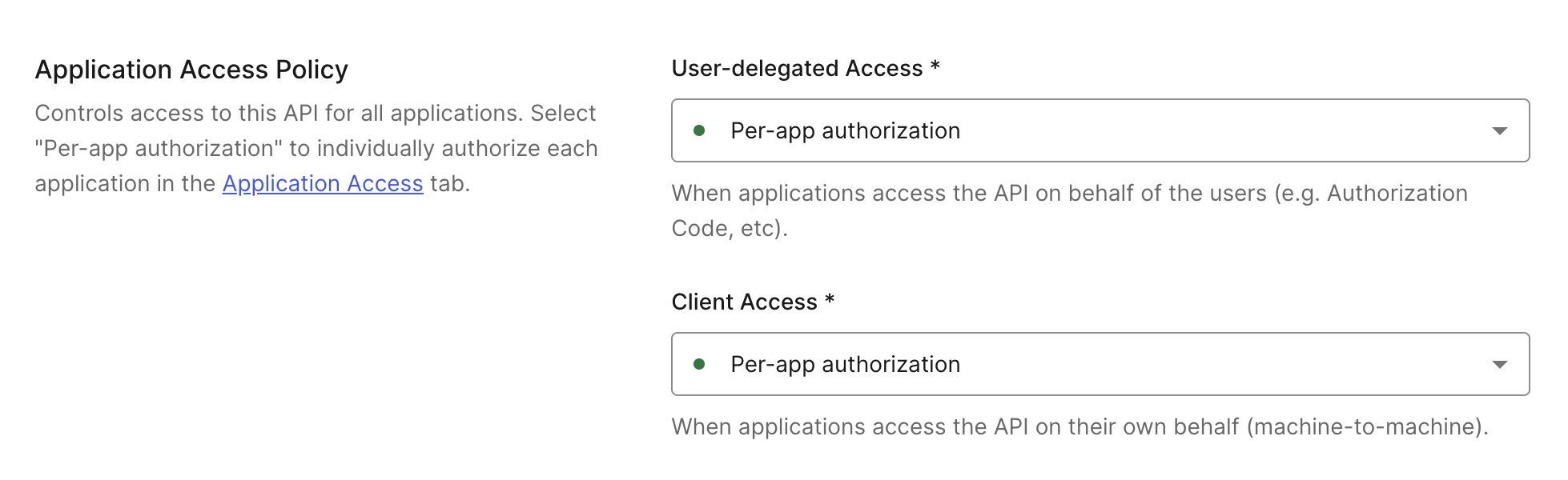
3. Scroll to **Application Access Policy** and set **User-Delegated Access** and **Client Access** to **Per-app authorization**.
4. Select **Save**.
Make a `POST` request to the `/api/v2/clients` endpoint with the following request body:
```bash cURL wrap lines theme={null}
curl --request POST \
--url 'https://YOUR_DOMAIN/api/v2/clients' \
--header 'Authorization: Bearer YOUR_MANAGEMENT_API_TOKEN' \
--header 'Content-Type: application/json' \
--data '{
"name": "Partner Application",
"is_first_party": false,
"app_type": "regular_web",
"callbacks": ["https://partner.example.com/callback"],
"grant_types": ["authorization_code", "refresh_token"],
"token_endpoint_auth_method": "client_secret_post"
}'
```
| **Parameter** | **Type** | **Description** |
| ---------------------------- | -------- | ------------------------------------------------------------------------------------------------------------------------------------------------------------------------------------------------------------------------------------------------------------------------------------------------------------------ |
| `name` | String | Required. The name of the application. |
| `is_first_party` | Boolean | Indicates whether the application is first-party (`true`) or third-party (`false`). |
| `app_type` | String | The type of application (e.g., `regular_web`, `native`, `spa`, `non_interactive`). |
| `callbacks` | Array | A list of allowed callback URLs for the redirect after authentication. |
| `grant_types` | Array | A list of types of OAuth2 grants this client is allowed to use. Third-party applications support `authorization_code`, `refresh_token`, and `client_credentials`. To learn more, read [Security Controls for Third-Party Applications](/docs/get-started/applications/third-party-applications/security-controls). |
| `token_endpoint_auth_method` | String | The authentication method for the token endpoint (e.g., `client_secret_post`). |
If successful, Auth0 creates the application with a `tpc_` Client ID prefix, `authorization_code` and `refresh_token` grant types, and sets `third_party_security_mode` to `strict`, indicating that enhanced security controls are enabled.
```json wrap lines theme={null}
{
"client_id": "tpc_aBcDeFgHiJkLmNoPqRsTuV",
"third_party_security_mode": "strict",
"is_first_party": false,
"name": "Partner Application",
"grant_types": ["authorization_code", "refresh_token"],
...
}
```
| **Parameter** | **Type** | **Description** |
| --------------------------- | -------- | ------------------------------------------------------------------------------------------------------------------------------------------ |
| `client_id` | String | The unique identifier for the application with a `tpc` prefix to indicate it's a third-party application created with strict mode enabled. |
| `third_party_security_mode` | String | Defines the security profile. Set to `strict` to enforce enhanced security constraints for third-party apps. |
| `is_first_party` | Boolean | Must be set to `false` when using `strict` security mode to identify the app as third-party. |
| `name` | String | The display name of the application. |
| `grant_types` | Array | The OAuth2 grant types this application is authorized to use (e.g., `authorization_code`). |
The `third_party_security_mode` property is set at creation and cannot be changed. To use a different security mode, create a new application.
## Configure API access policies
Third-party applications require explicit client grants to access APIs. You can configure API access policies in the following ways:
* [Per-application permissions](#per-application-permissions): Apply granular permissions to each application in your tenant.
* [Default permissions for all third-party applications](#default-permissions-for-all-third-party-applications): Apply default permissions to all third-party applications in your tenant.
When both per-application permissions and default permissions for third-party applications exist for the same API, per-application permissions take precedence. To learn more, read [Application Access to APIs: Client Grants](/docs/get-started/applications/application-access-to-apis-client-grants).
### Per-application permissions
To grant a specific third-party application broader or narrower access than the defaults, create a client grant for that application's `client_id`:
1. Navigate to **Applications > APIs** and select the API.
2. Go to the **Settings** tab.
3. Scroll to **Application Access Policy** and set **User-Delegated Access** and **Client Access** to **Per-app authorization**.
4. Select **Save**.
 When setting per-application permissions, you must individually authorize API access for each application:
1. Navigate to **Applications > APIs** and select the API.
2. Go to the **Application Access** tab.
3. Scroll to the application, select **Edit**, and then **Grant Access** for **User-Delegated Access** and/or **Client Access**. Then, select your desired permissions.
4. Select **Save**.
When setting per-application permissions, you must individually authorize API access for each application:
1. Navigate to **Applications > APIs** and select the API.
2. Go to the **Application Access** tab.
3. Scroll to the application, select **Edit**, and then **Grant Access** for **User-Delegated Access** and/or **Client Access**. Then, select your desired permissions.
4. Select **Save**.
 ```bash cURL wrap lines theme={null}
curl --request POST \
--url 'https://YOUR_DOMAIN/api/v2/client-grants' \
--header 'Authorization: Bearer YOUR_MANAGEMENT_API_TOKEN' \
--header 'Content-Type: application/json' \
--data '{
"client_id": "tpc_aBcDeFgHiJkLmNoPqRsTuV",
"audience": "https://api.example.com",
"scope": ["read:items", "write:items", "delete:items"],
"subject_type": "user"
}'
```
| **Parameter** | **Type** | **Description** |
| -------------- | -------- | --------------------------------------------------------------------------------------------------------------------------------------------------------------------------------------------------------------------------------------------------------------------------------------------------- |
| `client_id` | String | Specifies the application you want to create the client grant for. |
| `audience` | String | The unique identifier (URI) of the API the grant is being created for. |
| `scope` | Array | A list of permissions (scopes) that are allowed as part of this grant. |
| `subject_type` | String | Defines the type of application access allowed for the API:
```bash cURL wrap lines theme={null}
curl --request POST \
--url 'https://YOUR_DOMAIN/api/v2/client-grants' \
--header 'Authorization: Bearer YOUR_MANAGEMENT_API_TOKEN' \
--header 'Content-Type: application/json' \
--data '{
"client_id": "tpc_aBcDeFgHiJkLmNoPqRsTuV",
"audience": "https://api.example.com",
"scope": ["read:items", "write:items", "delete:items"],
"subject_type": "user"
}'
```
| **Parameter** | **Type** | **Description** |
| -------------- | -------- | --------------------------------------------------------------------------------------------------------------------------------------------------------------------------------------------------------------------------------------------------------------------------------------------------- |
| `client_id` | String | Specifies the application you want to create the client grant for. |
| `audience` | String | The unique identifier (URI) of the API the grant is being created for. |
| `scope` | Array | A list of permissions (scopes) that are allowed as part of this grant. |
| `subject_type` | String | Defines the type of application access allowed for the API:
- `user`: Used for user-delegated access, which corresponds to flows that generate a token associated with an end-user.
- `client`: Used for machine-to-machine access, such as the Client Credentials Flow.
|
### Default permissions for all third-party applications
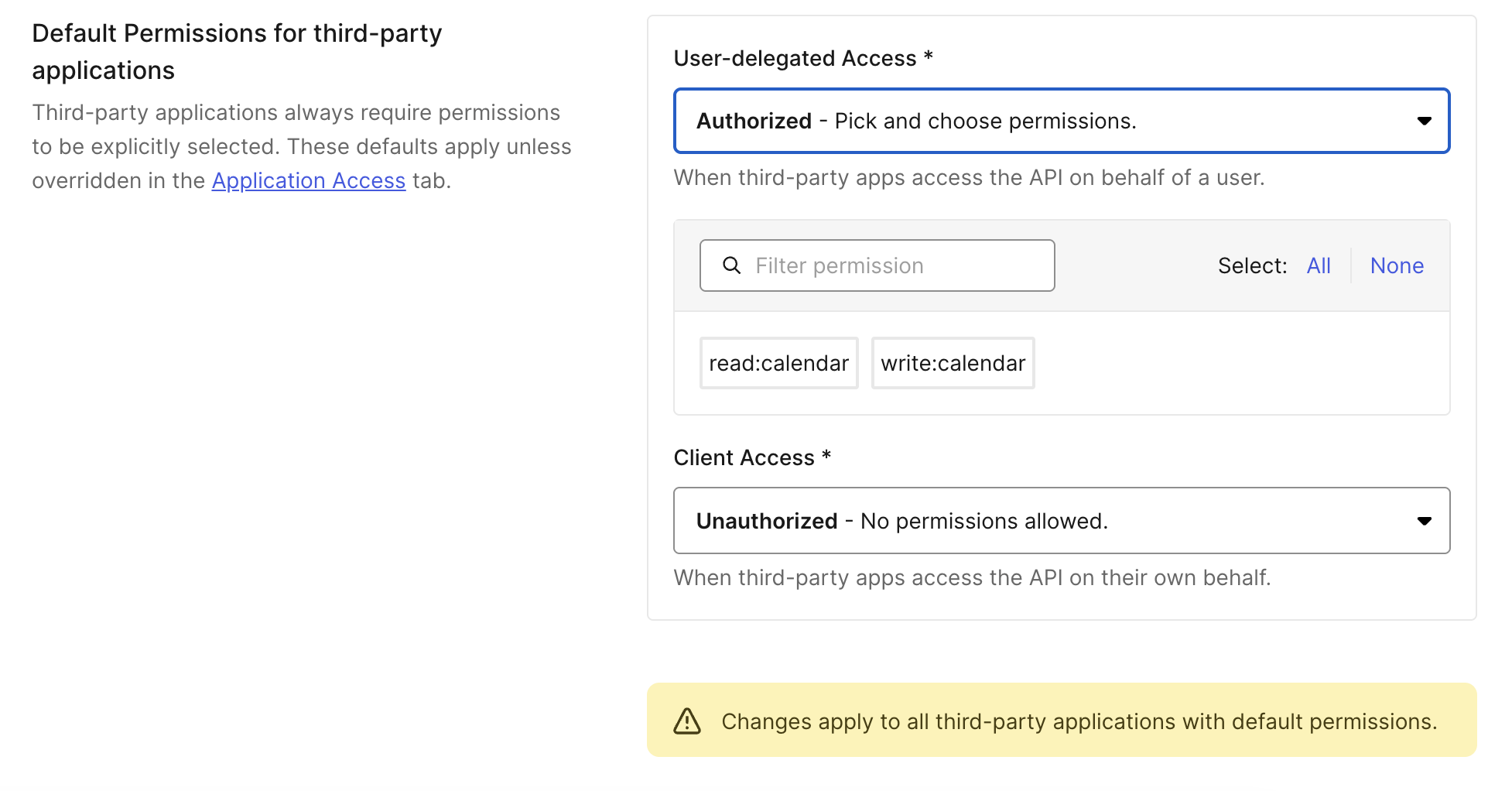
Default permissions define a baseline set of APIs and scopes available to all third-party applications. This is required for [Dynamic Client Registration](/docs/get-started/applications/dynamic-client-registration), where you cannot configure access for each application individually.
1. Navigate to **Applications > APIs** and select the API.
2. Go to the **Settings** tab.
3. Scroll to **Default Permissions for Third Party Apps**.
4. Select **Authorized** for **User-Delegated Access** or **Client Access**.
5. Select the scopes to grant, then select **Save**.
 Make a `POST` request to the `/api/v2/client-grants` endpoint with the following request body:
```bash cURL wrap lines theme={null}
curl --request POST \
--url 'https://YOUR_DOMAIN/api/v2/client-grants' \
--header 'Authorization: Bearer YOUR_MANAGEMENT_API_TOKEN' \
--header 'Content-Type: application/json' \
--data '{
"default_for": "third_party_clients",
"audience": "https://api.example.com",
"scope": ["read:items", "write:items"],
"subject_type": "user"
}'
```
| **Parameter** | **Type** | **Description** |
| -------------- | -------- | --------------------------------------------------------------------------------------------------------------------------------------------------------------------------------------------------------------------------------------------------------------------------------------------------- |
| `default_for` | String | Specifies if this grant is automatically applied to certain app types. Set to `third_party_clients` to ensure all third-party apps have access to this API by default. |
| `audience` | String | The unique identifier (URI) of the API the grant is being created for. |
| `scope` | Array | A list of permissions (scopes) that are allowed as part of this grant. |
| `subject_type` | String | Defines the type of application access allowed for the API:
Make a `POST` request to the `/api/v2/client-grants` endpoint with the following request body:
```bash cURL wrap lines theme={null}
curl --request POST \
--url 'https://YOUR_DOMAIN/api/v2/client-grants' \
--header 'Authorization: Bearer YOUR_MANAGEMENT_API_TOKEN' \
--header 'Content-Type: application/json' \
--data '{
"default_for": "third_party_clients",
"audience": "https://api.example.com",
"scope": ["read:items", "write:items"],
"subject_type": "user"
}'
```
| **Parameter** | **Type** | **Description** |
| -------------- | -------- | --------------------------------------------------------------------------------------------------------------------------------------------------------------------------------------------------------------------------------------------------------------------------------------------------- |
| `default_for` | String | Specifies if this grant is automatically applied to certain app types. Set to `third_party_clients` to ensure all third-party apps have access to this API by default. |
| `audience` | String | The unique identifier (URI) of the API the grant is being created for. |
| `scope` | Array | A list of permissions (scopes) that are allowed as part of this grant. |
| `subject_type` | String | Defines the type of application access allowed for the API:
- `user`: Used for user-delegated access, which corresponds to flows that generate a token associated with an end-user.
- `client`: Used for machine-to-machine access, such as the Client Credentials Flow.
|
## Configure connections
Third-party applications can only authenticate users through domain-level connections. Once a connection is promoted to the domain level, it becomes available to all third-party applications in the tenant.
To promote a connection:
1. Navigate to **Auth0 Dashboard > Authentication** and select the connection type (Database, Social, Enterprise).
2. Select the connection you want to use with third-party applications.
3. Enable the **Promote Connection to Domain Level** toggle.
To learn more, read [Promote Connections to Domain Level](/docs/authenticate/identity-providers/promote-connections-to-domain-level).
## Configure open redirect protection
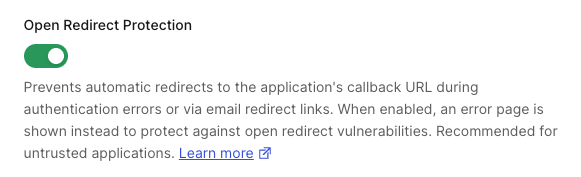
Third-party applications with enhanced security controls have **Open Redirect Protection** enabled by default. When enabled, Auth0 does not:
* Redirect to the application's callback URL on authentication errors
* Expose `application.callback_domain` in email templates
Only disable **Open Redirect Protection** for third-party applications where the configured callback URIs are trusted. To learn more, read [Redirect Protection](/docs/get-started/applications/third-party-applications/security-controls#redirect-protection).
1. Navigate to **Applications > Applications** and select the third-party application.
2. Go to the **Settings** tab and scroll to **Open Redirect Protection**.
3. Toggle the setting on or off.
4. Select **Save**.
 Set the `redirection_policy` property when creating or updating the application:
```bash theme={null}
curl --request PATCH \
--url 'https://{yourDomain}/api/v2/clients/{CLIENT_ID}' \
--header 'Authorization: Bearer {YOUR_MANAGEMENT_API_TOKEN}' \
--header 'Content-Type: application/json' \
--data '{
"redirection_policy": "allow_always"
}'
```
Set to `open_redirect_protection` to enable (default) or `allow_always` to disable.
## Dynamic Client Registration
All [dynamically registered clients](/docs/get-started/applications/dynamic-client-registration) are third-party applications. Before enabling DCR, configure [default API permissions](#default-permissions-for-all-third-party-applications) so that dynamically registered clients can access your APIs.
## Learn more
* [Third-Party Applications](/docs/get-started/applications/third-party-applications)
* [Security Controls for Third-Party Applications](/docs/get-started/applications/third-party-applications/security-controls)
* [User Consent and Third-Party Applications](/docs/get-started/applications/third-party-applications/user-consent-and-third-party-applications)
* [Dynamic Client Registration](/docs/get-started/applications/dynamic-client-registration)
* [Promote Connections to Domain Level](/docs/authenticate/identity-providers/promote-connections-to-domain-level)
Set the `redirection_policy` property when creating or updating the application:
```bash theme={null}
curl --request PATCH \
--url 'https://{yourDomain}/api/v2/clients/{CLIENT_ID}' \
--header 'Authorization: Bearer {YOUR_MANAGEMENT_API_TOKEN}' \
--header 'Content-Type: application/json' \
--data '{
"redirection_policy": "allow_always"
}'
```
Set to `open_redirect_protection` to enable (default) or `allow_always` to disable.
## Dynamic Client Registration
All [dynamically registered clients](/docs/get-started/applications/dynamic-client-registration) are third-party applications. Before enabling DCR, configure [default API permissions](#default-permissions-for-all-third-party-applications) so that dynamically registered clients can access your APIs.
## Learn more
* [Third-Party Applications](/docs/get-started/applications/third-party-applications)
* [Security Controls for Third-Party Applications](/docs/get-started/applications/third-party-applications/security-controls)
* [User Consent and Third-Party Applications](/docs/get-started/applications/third-party-applications/user-consent-and-third-party-applications)
* [Dynamic Client Registration](/docs/get-started/applications/dynamic-client-registration)
* [Promote Connections to Domain Level](/docs/authenticate/identity-providers/promote-connections-to-domain-level)