> ## Documentation Index
> Fetch the complete documentation index at: https://docs-dev.auth0-mintlify.app/llms.txt
> Use this file to discover all available pages before exploring further.
# Permissive Mode for Third-Party Applications
> Learn about permissive mode for third-party applications.
Customers who have at least one tenant using third-party applications before April 2026 may have applications operating in permissive mode. This mode preserves pre-existing behavior for backward compatibility.
## Who can use permissive mode
Permissive mode is available to customers who have at least one tenant with third-party applications before April 2026. All tenants under that customer's account can create permissive third-party applications, even tenants that did not previously have third-party applications.
These customers can:
* Continue operating pre-existing third-party applications with their current behavior
* Create new third-party applications with `third_party_security_mode: "permissive"` via the Management API
* Create new applications with enhanced security controls at any time
Customers without prior third-party application usage always create applications with enhanced security controls. They cannot use permissive mode.
## What permissive mode means
Third-party applications in permissive mode behave similarly to first-party applications in terms of available features:
* Most grant types are available (authorization code, implicit, client credentials, device code)
* OIDC scopes and ID tokens are supported
* API access follows the API's configured [access policy](/docs/get-started/apis/api-access-policies-for-applications) (not forced to require a client grant)
* Standard Client ID format (no `tpc_` prefix)
* All client properties can be configured
Permissive mode requires more configuration effort from the admin to enforce security controls. You are responsible for:
* Configuring [API access policies](/docs/get-started/apis/api-access-policies-for-applications) on each API to control which third-party applications can access them
* Reviewing which grant types and features are enabled for each application
* Monitoring third-party application behavior through [tenant logs](/docs/deploy-monitor/logs)
## The `third_party_security_mode` property
Every third-party application has a `third_party_security_mode` property that indicates its security mode. This property is set at creation and cannot be changed.
| **Value** | **Meaning** |
| ------------ | ------------------------------------------------------------------------------------------------- |
| `strict` | Enhanced security controls. OAuth 2.1 alignment, explicit API authorization, focused feature set. |
| `permissive` | Pre-existing behavior. All features available, admin configures security controls manually. |
Third-party applications created before the introduction of security modes return `third_party_security_mode: "permissive"` in API responses.
## Feature comparison
| **Capability** | **Enhanced security controls (strict)** | **Pre-existing behavior (permissive)** |
| --------------------------- | -------------------------------------------------------------------------------------------------------------------------------------- | -------------------------------------- |
| **Grant types** | `authorization_code`, `refresh_token` | Most grant types (except `password`) |
| **PKCE** | Mandatory | Optional |
| **OIDC** | Not supported. Planned for a future release. | Supported |
| **API authorization** | Always requires explicit client grant | Follows API access policy |
| **Classic Login** | Not supported | Supported |
| **Legacy endpoints** | Not supported | Available |
| **Client ID format** | `tpc_` prefix | Standard format |
| **Configurable properties** | [Curated set of properties](/docs/get-started/applications/third-party-applications/security-controls#restricted-client-configuration) | All properties |
| **Future capabilities** | Rate limits and future improved security and management capabilities | Not available |
| **Creation via Dashboard** | Supported | Not available via Dashboard |
## Dynamic Client Registration in permissive mode
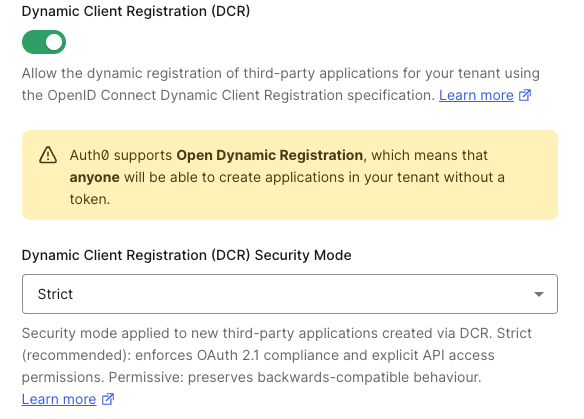
If your account is eligible for permissive mode and you use [Dynamic Client Registration](/docs/get-started/applications/dynamic-client-registration), you can control the security mode for dynamically registered clients with a separate tenant setting.
1. Navigate to **Settings > Advanced**.
2. Under **Dynamic Client Registration (DCR) Security Mode**, select **Permissive**.
3. Select **Save**.
 ```bash theme={null}
curl --request PATCH \
--url 'https://{yourDomain}/api/v2/tenants/settings' \
--header 'Authorization: Bearer {YOUR_MANAGEMENT_API_TOKEN}' \
--header 'Content-Type: application/json' \
--data '{
"dynamic_client_registration_security_mode": "permissive"
}'
```
The `dynamic_client_registration_security_mode` setting is independent of the default for applications created via `POST /api/v2/clients`. You can configure it at any time.
If you set `dynamic_client_registration_security_mode` to `strict`, configure [default API permissions](/docs/get-started/applications/application-access-to-apis-client-grants#default-permissions-for-third-party-applications) first. Without them, dynamically registered clients cannot access any APIs.
## Adopt enhanced security controls
Auth0 recommends adopting enhanced security controls for all new third-party applications. The `third_party_security_mode` property cannot be changed after an application is created — you cannot convert an existing permissive application to strict, or vice versa. Instead, you choose which security mode to use when creating new applications going forward.
To understand how the default for new applications is changing and how to prepare, read [Migrate to Enhanced Security for Third-Party Applications](/docs/troubleshoot/product-lifecycle/deprecations-and-migrations/migrate-to-enhanced-security-third-party-applications).
If you need to replace an existing permissive application with a strict one, you must create a new application. This invalidates all existing refresh tokens and user grants for the old application. Coordinate the cutover with the external party to minimize disruption.
## Learn more
* [Third-Party Applications](/docs/get-started/applications/third-party-applications)
* [Security Controls for Third-Party Applications](/docs/get-started/applications/third-party-applications/security-controls)
* [Migrate to Enhanced Security for Third-Party Applications](/docs/troubleshoot/product-lifecycle/deprecations-and-migrations/migrate-to-enhanced-security-third-party-applications)
* [Application Access to APIs: Client Grants](/docs/get-started/applications/application-access-to-apis-client-grants)
* [API Access Policies for Applications](/docs/get-started/apis/api-access-policies-for-applications)
```bash theme={null}
curl --request PATCH \
--url 'https://{yourDomain}/api/v2/tenants/settings' \
--header 'Authorization: Bearer {YOUR_MANAGEMENT_API_TOKEN}' \
--header 'Content-Type: application/json' \
--data '{
"dynamic_client_registration_security_mode": "permissive"
}'
```
The `dynamic_client_registration_security_mode` setting is independent of the default for applications created via `POST /api/v2/clients`. You can configure it at any time.
If you set `dynamic_client_registration_security_mode` to `strict`, configure [default API permissions](/docs/get-started/applications/application-access-to-apis-client-grants#default-permissions-for-third-party-applications) first. Without them, dynamically registered clients cannot access any APIs.
## Adopt enhanced security controls
Auth0 recommends adopting enhanced security controls for all new third-party applications. The `third_party_security_mode` property cannot be changed after an application is created — you cannot convert an existing permissive application to strict, or vice versa. Instead, you choose which security mode to use when creating new applications going forward.
To understand how the default for new applications is changing and how to prepare, read [Migrate to Enhanced Security for Third-Party Applications](/docs/troubleshoot/product-lifecycle/deprecations-and-migrations/migrate-to-enhanced-security-third-party-applications).
If you need to replace an existing permissive application with a strict one, you must create a new application. This invalidates all existing refresh tokens and user grants for the old application. Coordinate the cutover with the external party to minimize disruption.
## Learn more
* [Third-Party Applications](/docs/get-started/applications/third-party-applications)
* [Security Controls for Third-Party Applications](/docs/get-started/applications/third-party-applications/security-controls)
* [Migrate to Enhanced Security for Third-Party Applications](/docs/troubleshoot/product-lifecycle/deprecations-and-migrations/migrate-to-enhanced-security-third-party-applications)
* [Application Access to APIs: Client Grants](/docs/get-started/applications/application-access-to-apis-client-grants)
* [API Access Policies for Applications](/docs/get-started/apis/api-access-policies-for-applications)